Mobile AR Fire-Escape Simulator · Learn. Decide. Survive.
TeamYifan Xu · Lejie Lin
PlatformAndroid · Mobile AR
TechUnity · ARCore · C#
CourseCIM 433 · Spring 2026
RoleDesign · UX · Testing
01
App Description
AR Fire Safety Trainer is a mobile augmented reality application designed to teach real fire-escape decision-making through interactive simulation — deployed directly in the user's physical environment without expensive equipment.
The app places virtual fire, smoke, and interactive objects (a door, a window, a fire extinguisher, a wet towel) inside a real room scanned by ARCore. Players must assess the severity of the fire, choose the right tools, and act in the correct sequence to survive. Wrong decisions — like opening a window while indoor fires still burn, or rushing through a smoke-filled hallway — lead to distinct bad endings that explain exactly why the action was dangerous.
Goal
Build instinctive fire-safety responses through scenario-based AR simulation, not passive video or poster training.
Target Users
Students, office workers, and general public in schools and workplaces — anywhere a mobile phone can scan a floor.
Why AR?
AR forces interaction with real exits and real spatial constraints, building muscle memory that 2D video cannot.
Key Principle
In high-rise fires, blind hallway evacuation through smoke is often fatal. The app teaches when to shelter in place, not just how to run.
Unity ARCoreAndroidAR FoundationC#Particle SystemsFire Safety Ed
Start Screen
About
Safety Notes
Instructions
02
Storyboard
The user flow is divided into three phases: onboarding, AR setup, and the scenario. The app always presents safety context before placing the user in danger.
Setup Flow — Before the Fire Starts
①User opens the app and reads onboarding pages: app purpose, safety notes, and instructions.
②Tap a wall to place the door prefab — the fire exit.
③Tap another wall to place the window.
④Tap the floor — fire and smoke spawn, and the scenario begins.
🔥 Small Fire Scenario — Escape if Safe
①Fire covers ~10–20% of the floor area. An extinguisher spawns nearby. The door is clear.
②Player assesses: pick up the extinguisher, aim at fire, hold the spray button until all fires are destroyed.
③With fires out, tap the door to escape. Success: "You extinguished the fire and escaped safely."
✗Bad ending: Opening the door without extinguishing → house destroyed by spreading fire.
Small fire — scene starts, extinguisher highlighted
Hold-to-spray extinguisher in action
Bad ending — fire not extinguished
Success — fire out, door opened
🔥🔥 Large Fire Scenario — Trapped, Survive in Place
①The hallway outside is engulfed. A smoky door seeps smoke into the room. The player is trapped.
②Aim at the smoky door and press the towel button → a wet towel seals the gap, stopping smoke ingress.
③Use the extinguisher to extinguish all indoor fires.
④With fires out, open the window → smoke clears → rescue arrives. Success: "You cleared the toxic smoke and waited for rescue."
✗ABad ending (door): Opening the door exposes you to the smoke-filled hallway — you get lost and die.
✗BBad ending (window): Opening the window while fires remain causes backdraft — fresh oxygen ignites accumulated gases.
Extinguisher selected — aim at fire
Success — cleared smoke, waited for rescue
Failed — opened door into smoke-filled hallway
Bad ending — window opened with active fire (backdraft)
03
AR Development
The app is built on Unity AR Foundation with ARCore for Android. The AR layer is what makes the safety training meaningful: rather than watching fire on a flat screen, the user sees virtual hazards anchored in their actual room, requiring real spatial reasoning to respond.
Plane Detection
ARCore detects real horizontal and vertical planes. User taps define three anchors: the door (vertical wall), the window (vertical wall), and the fire floor (horizontal plane).
Spatial Realism
Virtual fire and smoke are anchored to detected floor geometry. The door bottom aligns with the real floor height, making the simulation feel physically present.
Particle Fire & Smoke
Realistic Unity particle systems overlay the camera feed. Smoke fills the upper portion of the frame; fire uses separate layered particle emitters per fire object.
Physical Interaction
The extinguisher uses a hold-to-spray particle collision system — spray particles physically collide with fire GameObjects to destroy them, not abstract raycast clicks.
AR is not just cosmetic here. The user's physical position and orientation directly determine what fire they can see, aim at, and extinguish. They must move their body and phone as they would in a real emergency. This builds the kind of spatial memory that passive training cannot.
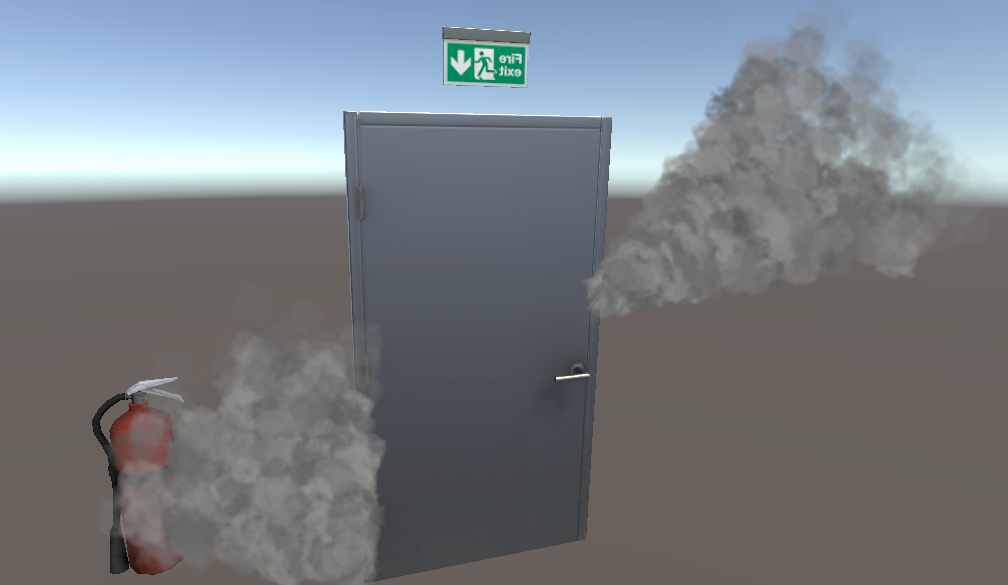
Door prefab placed on a detected vertical plane — smoke particles around base
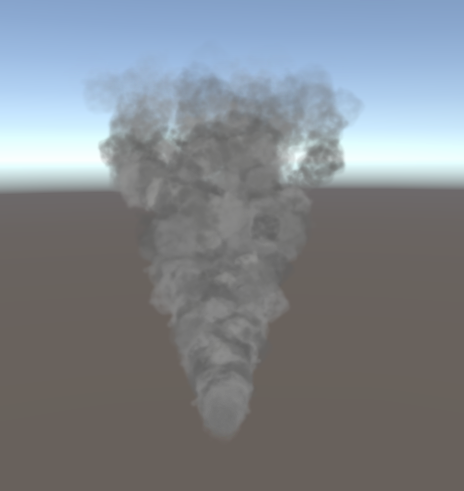
Smoke particle system — dense rising column used for door smoke and ambient haze
The wet towel mechanic also exploits AR space: the player must physically aim their phone camera at the smoky door before pressing the towel button. A flying-towel animation arcs from the camera toward the door, reinforcing the physical act of sealing. The SmokeDoorSealTarget script manages pre-positioned towel visuals and stops all associated smoke particle systems once sealed:
SmokeDoorSealTarget.cs — partial
publicboolAddTowel() {
if (IsFullySealed) returnfalse;
towelVisuals[currentSealCount].SetActive(true);
currentSealCount++;
returntrue;
}
publicvoidOnSealed() {
foreach (var ps in smokeParticles) {
if (ps != null) ps.Stop(); // stop smoke once door is sealed
}
}
Fire destruction uses Unity's OnParticleCollision event. Each fire object carries a FireDestroyOnParticleHit component: when the extinguisher spray (tagged ExtinguisherSpray) collides with it, the fire GameObject is immediately destroyed. This makes extinguishing feel genuinely physical rather than button-press instant:
FireDestroyOnParticleHit.cs
private voidOnParticleCollision(GameObject other) {
if (other.CompareTag("ExtinguisherSpray")) {
Destroy(gameObject);
}
}
The hold-to-spray UX is handled by HoldButton.cs, which implements Unity's IPointerDownHandler / IPointerUpHandler interfaces — StartSpray on press, StopSpray on release — giving the user physical control over spray duration rather than a single tap:
HoldButton.cs
public voidOnPointerDown(PointerEventData eventData) {
if (controller != null) controller.StartSpray();
}
public voidOnPointerUp(PointerEventData eventData) {
if (controller != null) controller.StopSpray();
}
04
Demonstration
The video below shows a full walkthrough of AR Fire Safety Trainer — from onboarding and AR plane setup through both fire scenarios and their endings, captured on a real Android device in a real room.
Full demo — plane detection, scenario setup, extinguisher, wet towel, and all endings
05
Design Iteration
The app went through three major design pivots — each driven by a failure mode discovered during testing on real devices in real rooms.
01
Prototype — March 2026
Smoke Maze Navigation
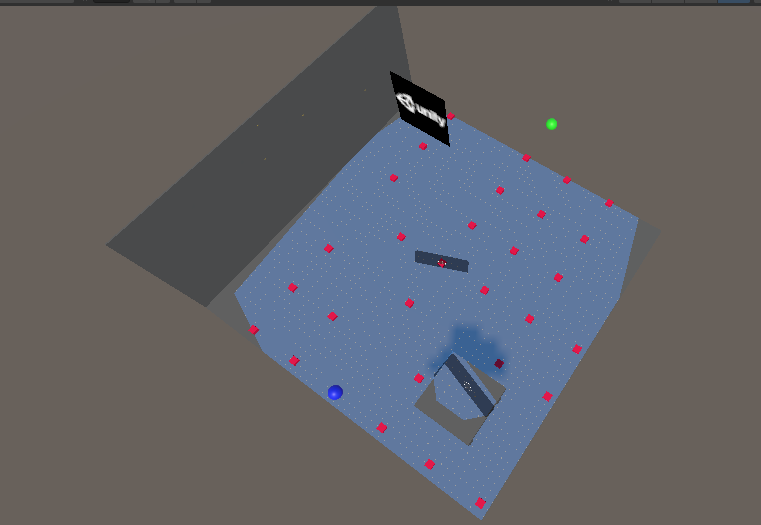
The original concept was a procedurally generated maze built from detected AR planes, filled with smoke clouds. Players had to navigate from one end to the other staying low. Problem: ARCore plane detection on mobile phones is inconsistent — detected planes were fragmented, too small, or angled. A maze could not be reliably built. The navigation-first design also didn't teach real safety behaviors.
02
Redesign — April 2026
Scenario-Based AR (Place & Start)
Replaced the maze entirely with a tap-to-place setup: user places a door, a window, and defines a floor area with three deliberate taps. This solved the plane-detection problem by letting the user specify what each surface means. Two fire scenarios (small / large) were introduced. Problem: The extinguisher system used abstract raycast clicks — not intuitive on mobile, and not immersive.
03
Final — May 2026
Decision & Consequence System
Full overhaul of interactions: hold-to-spray particle collision for the extinguisher, wet towel aim-and-seal for the door, and a conditional window logic that teaches backdraft. Each wrong decision leads to a distinct bad ending with an explanation. The large-fire scenario was completely rewritten around the "close the door, wait for rescue" principle backed by NFPA fire safety guidelines.
Iteration 1 — the original maze prototype. Red dots = candidate wall positions; blue/green = player/exit markers. Abandoned due to unreliable plane detection.
06
Evaluation
We evaluated the app on two levels: whether it works technically (does the AR simulation run without errors?) and whether it achieves its educational goal (does the player learn the right behavior?).
📱
Technical Functionality
Both scenarios complete end-to-end without crashes on Android. All five interaction types work correctly: extinguisher spray, wet towel seal, door open, window open, and fire destruction on particle collision. All 5 endings (2 success, 3 bad) are reachable and display the correct feedback text.
🎯
Educational Effectiveness
Decision-based endings give immediate, specific feedback: bad endings name the exact reason for failure and what should have been done instead. This mirrors how consequence-based learning reinforces correct behavior more effectively than instruction alone.
🔥
Backdraft Teaching
The window-with-active-fire bad ending is the app's most important teaching moment. Opening windows during an indoor fire is a common and fatal mistake — adding fresh oxygen to accumulated flammable gases causes rapid re-ignition. The in-app consequence makes this visceral and memorable.
🚪
Close-the-Door Principle
The wet-towel mechanic and the large-fire scenario reinforce NFPA's "Close Before You Doze" principle — a closed door can hold back fire and smoke for minutes, buying critical time. Players who skip sealing the door experience smoke damage and failure, creating a lasting memory link.
One limitation we noted: the app evaluates decisions in a fixed scripted environment and cannot yet adapt to the variability of real emergency behavior. Future versions could add a timer, a health system (already partially implemented in PlayerHealth.cs), and user playtest questionnaires to measure knowledge retention after play.
public voidTakeDamage(float amount) {
currentHealth -= amount;
currentHealth = Mathf.Max(0, currentHealth);
RefreshUI();
if (currentHealth <= 0) Debug.Log("Dead");
}
07
Implementation Issues
Building a real-time AR simulation on mobile — with particles, physics, UI, and ARCore plane detection all running simultaneously — surfaced a series of technical and design challenges. Below are the most significant, with the solutions we shipped.
Issue
Solution
Mobile performance drop with fire, smoke, fog, and spray particles running together
Reduced particle count, simplified emitter shapes, shortened particle lifetimes, disabled always-on smoke emitters when not needed
Smoke maze too complex — ARCore planes were fragmented, non-contiguous, and too small to build a maze
Replaced with scenario-based design: user taps define door, window, and floor reference points instead of relying on automatic mesh reconstruction
Unpredictable plane detection across different real environments (carpet, tile, low light)
Constrained interaction to clear horizontal and vertical planes; added visual guides for when to tap
Confusing immediate start — original code triggered the scenario on the very first tap
Redesigned into three explicit sequential setup steps with on-screen prompts before any fire spawns
Raycast extinguisher felt abstract and unphysical — no sense of "spraying" at the fire
Replaced with hold-to-spray particle system; fires destroyed via OnParticleCollision, giving physical tactile feedback
Extinguisher spray deformation — spray position and shape were unstable in world space
Attached spray emitter to camera with adjustable local offset; set particle simulation space to Local to prevent world-drift
Door and window had different local orientations — one rotated correctly, the other appeared backward
Added separate per-prefab rotation offset controls in Inspector instead of sharing a single rotation value
Wet towel placement was inaccurate — free-placement felt arbitrary and often missed the door gap
Replaced with an aim-at-door interaction: the SmokeDoorSealTarget script owns pre-positioned towel visuals; the player triggers a flying-towel animation then the prefab reveals the result
Backdraft logic missing — early version let players open the window freely
Added conditional check: if any indoor fires remain active when window is opened → bad ending; if all fires out → success path with smoke-clear and rescue
Ending UI panel hierarchy — hiding the panel left text and buttons still visible
Moved all ending text and the Play Again button as children of the panel object so a single SetActive controls everything
Different screen aspect ratios revealed skybox behind the canvas on some phones
Set all full-screen background panels to Stretch anchors, removed fixed sizing, adjusted Canvas Scaler reference resolution
Intro content was hardcoded in C#, making it impossible to edit text without recompiling
Moved each intro page into a separate UI page GameObject; text and images are now editable directly in the Unity Inspector
.png)
.png)
.png)
.png)
.png)
.png)
 Failed.png)
 Success.png)
.png)
 Success.png)
 Failed.png)
 Failed.png)